CU Student Feedback on Courses
Student feedback surveys play a crucial role in enhancing teaching and learning at Commonwealth University. Instructors highly appreciate students' candid and valuable input, which the University utilizes to enhance courses and the educational experience as a whole. All student feedback surveys are conducted online or via QR code and are anonymous.
Student Information
Student feedback:
- helps instructors understand what supports student learning
- contributes to course and program improvement
- supports teaching effectiveness across the University
Instructors value thoughtful feedback and use student comments to reflect on and strengthen future teaching and learning experiences.
During the open feedback period, the student instrument feedback link on this webpage gives students access to the survey. Students may also access the survey via email notifications containing a secure link or through a QR code or direct link shared by the instructor during class. For courses using the default online administration, the Office of Institutional Effectiveness sends students an initial email at the start of the feedback period, followed by weekly reminder emails that include instructions and a direct link to the student instrument feedback application. Courses using non-default administration options (such as QR code/link delivery or excluded courses) do not receive these automated email reminders. In all cases, students authenticate and complete the survey using their Commonwealth University Single Sign-On (SSO) credentials.
All student feedback surveys are anonymous. Individual responses are not identifiable, and instructors do not receive results until after grades are submitted.
Current Feedback Period and Relevant Dates
- Opening Date: Wednesday, September 30, 2026
- Closing Date: Friday, October 9, 2026
Note: Last day to make changes is Tuesday, September 29, 2026
All changes must be made by the published deadline for the feedback period.
- Opening Date: Monday, November 16, 2026
- Closing Date: Monday, December 7, 2026
Note: Last day to make changes is Sunday, November 15, 2026
All changes must be made by the published deadline for the feedback period.
Faculty Information
All courses will be preloaded in the Faculty App; please disregard any courses or dates outside Sessions 1 and 3. Student feedback surveys will be administered during the dates listed under the Current Feedback Period and Relevant Dates section above.
Faculty may select how student feedback surveys are administered for their courses. Administration options include online, QR code/link, or excluded, as described below.
- Online (Default Option)
All courses default to “online” administration. No action is required unless faculty wish to change the administration option, customize feedback dates, or exclude a course from the feedback process. - QR Code/Link
Faculty selecting this option will receive a QR code and a direct link that may be shared with students during class or lab sessions. Students scan the QR code or access the link and log in using their Commonwealth University Single Sign-On (SSO) credentials to complete feedback during the designated administration period. Faculty may customize the beginning and ending dates for QR code/link administration within the approved feedback window using the Faculty App. Providing the direct link also allows accommodations for students who do not have the technology to scan a QR code. - Excluded
Courses designated as “excluded” will be removed from the student feedback process.
Online administration is the default. Faculty who wish to change the default “online” option may:
- Log into the Faculty App using SSO credentials and select the desired feedback type by using the green edit button on the lower middle of the screen.
Contact Jim Fiamoncini with the five-digit course number(s) to be updated by the published deadline.
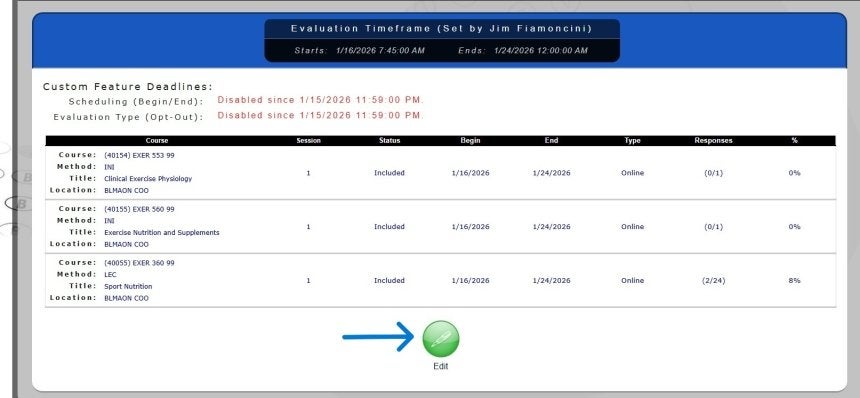
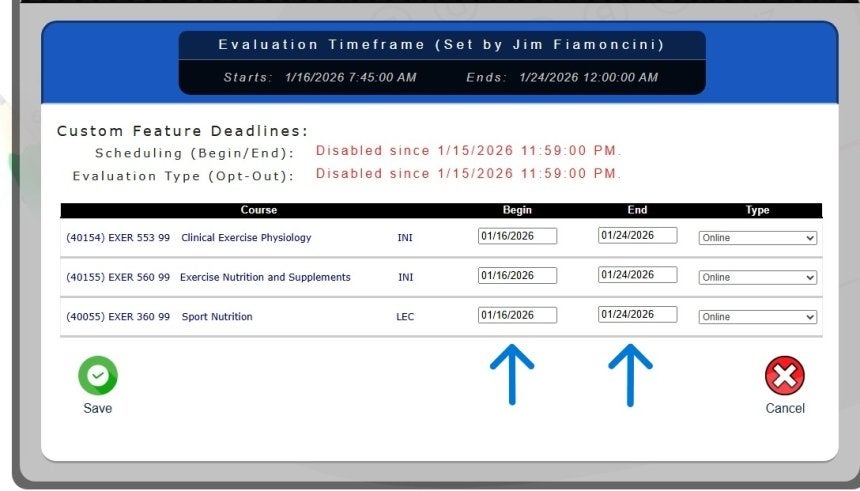
Using the Faculty App, faculty may customize the beginning and ending dates for online or QR code administration within the feedback window to align better with what is happening in class. Changes must be made by the published deadline; otherwise, surveys will default to the full administration period. A tutorial video within the Faculty App can assist navigation and its use.
The Faculty App also allows faculty to view response counts and percentages during the feedback period to help monitor participation.
Note: The end date should be the next day of your intended end period. The system sets this time to 12:00 a.m. of the date put into this field. Looking below you will see the end date set to 1/24/2026, this means the period will be open thru 1/23 and close at midnight on 1/24.
For courses using the default online administration, the Office of Institutional Effectiveness sends students an initial email at the start of the feedback period, followed by weekly reminder emails. These messages include instructions and a direct link to the student feedback instrument. Courses using non-default administration options (such as QR code/link delivery or excluded courses) do not receive these automated email reminders.
While monitoring response rates can be helpful, faculty should use care when encouraging student participation. Reminding a class of the percentage of students who have completed the student feedback survey may unintentionally create concern that individual responses could be identified, even though institutional security measures fully protect student anonymity. To minimize this perception, faculty are encouraged to frame reminders in a general and reassuring manner. For example, faculty might communicate to students:
“I received a report from Institutional Effectiveness indicating that XX% of students have completed the online student feedback survey. If you have not yet responded, please take a few moments to do so, as I value your feedback.”
Faculty may add up to ten (10) optional questions, provided they follow the required A–B–C–D–E response format. Optional questions vary by survey type, may differ across course sections, and may be revised from one semester to another. Because the App does not allow individual questions to be added online, faculty must distribute any optional questions directly to students.
For the student feedback surveys, optional items must be numbered 18 through 27; for the clinical/student teaching experience survey, optional items must be numbered 11 through 20. Responses to optional items are reported separately from the standard feedback results and are provided as a one-page supplement in a straightforward item-analysis format showing the number and percentage of responses for each item.
There is no centralized recordkeeping or electronic retention of student responses to optional items; therefore, faculty are responsible for maintaining their own records of the optional questions used during each feedback period.
Feedback reports and student comments will be available approximately one week after finals, once grades have been submitted and all students can view their grades. Student comments are distributed via email from the EvalComments account, with instructors receiving one email per course containing all comments submitted for that course. Feedback reports are released after student comments and are generated in a random order. Requests regarding the reporting process should be directed to Jim Fiamoncini.

Contact

Institutional Effectiveness

- University-wide