Cisco Telephony Modernization Project
Executive Overview
Commonwealth University is executing a strategic modernization of its campus telephony environment to enhance reliability, improve user experience, and support long-term sustainability. This initiative standardizes a unified Cisco-based communications platform across all campuses, replacing legacy systems and aligning with current and future technology needs.
The upgrade delivers immediate benefits, including improved call quality, enhanced mobility (e.g., Bluetooth pairing), and more intuitive user interfaces. It also streamlines IT support, strengthens call center capabilities, and provides a scalable foundation for future growth. The University anticipates significant annual savings through reduced maintenance and increased operational efficiency.
Deployment at the Bloomsburg campus will begin May 18 and conclude by June 30, completing the transition to a unified platform already in place at Lock Haven and Mansfield. Departments will receive advance scheduling to ensure a smooth rollout. Vendor support will be available at the start of the Fall semester to assist with training and post-deployment needs.
Key Benefits
- Improved call quality and reliability
- Modern features including Bluetooth pairing and customizable settings
- Consistent phone experience across all campuses
- Enhanced support for call centers and departments
- Better integration with mobile and desktop tools (Cisco Jabber)
Project Timeline
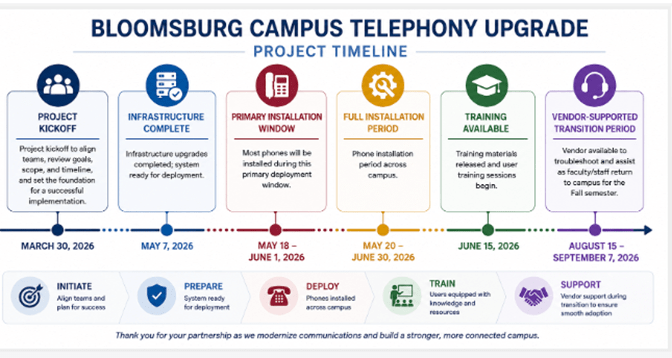
- March 30, 2026 – Project kickoff
- May 7, 2026 – Infrastructure upgrades completed; system ready for deployment
- May 18 – June 1, 2026 – Primary phone installation window (majority of devices deployed)
- May 20 – June 30, 2026 – Full installation period across campus
- June 15, 2026 – Training materials released; user training sessions begin
- August 15 – September 7, 2026 – Vendor-supported transition period aligned with fall return to campus
What to Expect
New Cisco desk phones will replace existing Avaya devices across campus, with installations scheduled over the summer to minimize disruption. Departments will receive advance notice prior to deployment. Some older basic phones will remain in service on the new system but will not be upgraded. Limited-service disruptions are expected between May 18 and June 1 during infrastructure and device deployment.
Training & Support
Training resources will be available starting June 15:
📘 Cisco Unified IP Phone User Guide
🎥 Cisco Phone Training Videos available in the section below.
📱 Cisco Self Care Portal Guide (coming soon)
The Self Care Portal (coming soon) allows you to:
- Set up speed dials
- Configure call forwarding
- Adjust phone settings
Yes. From August 15 – September 7, vendor support will be available to assist as faculty and staff return.
Quick Start Resources
Below are step-by step instructions:
Initial Setup (First-Time Use)
- Access Voicemail: Press the Messages button (envelope icon) on your Cisco phone.
- Enter Temporary PIN: When prompted, enter the default PIN provided by your IT department (commonly 12345, 121212, or 0000) followed by the pound key (#).
- Initial Tutorial: The system will guide you through the initial setup. Do not hang up until the system states that you have finished enrollment.
- Record Your Name: At the prompt, speak your first and last name after the tone, then press #.
- Record Personal Greeting: Follow prompts to record a personal greeting (e.g., "Hi, this is [Name], I am not available...") and press # to finish.
- Change PIN: Enter a new personal PIN
- Finalize: The system will confirm that enrollment is complete
Voicemail Security
- Set a strong PIN
- Do not share your PIN
- Update it periodically
Work From Anywhere with Cisco SoftPhone
*Please note that Jabber functionality will be available the day after your upgraded campus desk phone is installed and configured by our provider.
All Commonwealth University employees have access to Cisco SoftPhone features through the University telephone system. SoftPhone technology allows employees to make and receive University phone calls using a computer or mobile device instead of a traditional desk phone.
What Is a SoftPhone, and can I use it?
- A SoftPhone is a software-based phone application that provides many standard office phone features, including:
- Making and receiving calls
- Accessing voicemail
- Caller ID and contacts
- Call forwarding
- Conference calling
Yes, SoftPhones use an internet connection and allow all employees to use their University extension from nearly anywhere.
Cisco Jabber
Cisco Jabber is the University’s primary SoftPhone application and is available for:
- Windows and macOS
- iPhone/iPad
- Android devices
Employees can use Jabber to:
- Place and receive calls using their University number
- Access voicemail
- Use headsets or built-in audio devices
- Work remotely or while traveling
Jabber can be used alongside a desk phone or, in some cases, instead of one.
Benefits
SoftPhone features provide:
- Flexibility for remote and hybrid work
- Mobility across devices and locations
- Consistent access to your University phone number and voicemail
- Reduced dependence on physical desk phones
SoftPhone also helps employees keep personal phone numbers private while making University business calls.
Getting Started
To use Cisco SoftPhone features:
- Download Cisco Jabber
- Install Cisco Jabber on your computer or mobile device
- Sign in with your University credentials
- Configure your headset, microphone, or speakers
Training Videos
Frequently Asked Questions (FAQ)
Commonwealth University is upgrading to a modern Cisco Unified Communications platform. This replaces legacy phone systems with a more reliable, flexible, and feature-rich solution across all campuses.
This upgrade improves:
- Call quality and reliability
- User experience and mobility
- Supportability and security
- Long-term cost efficiency
Phone installations will occur between May 20 – June 30, with most deployments happening between May 18 – June 1. Your department will receive advance notice.
The installations will occur on the following schedule:
| Date | Qty | Building |
|---|---|---|
| 18 - May | 134 | AAB |
| 19 - May | 121 | AL, ALA, BMC, P&C, AH, HPE, GC |
| 20 - May | 114 | Grounds-TIP, NFH, JKA, BFH |
| 21 - May | 89 | DRSH, SC, KUB, BCH |
| 22 - May | 98 | MCHS |
| 26 - May | 119 | SSC, HSC, HCA, ERH |
| 27 - May | 112 | CEH, SH |
| 28 - May | 47 | Remaining Locations |
| 29 - May | Remaining Locations |
No. Your existing phone number and extension will remain the same.
In most cases, no action is required. Once installed, you may:
- Log in (if required)
- Set up voicemail
- Customize settings (speed dials, forwarding, etc.)
- Email: helpdesk@commonwealthu.edu
- Phone: xHELP (x4357)
- IT Support Portal
- Bluetooth pairing with mobile devices
- Bluetooth functionality may vary slightly depending on device model and operating system.
- Improved voicemail system
- Speed dials and favorites
- Call forwarding and mobility options
- Enhanced display and usability
Yes. Many Cisco phones support Bluetooth pairing, allowing you to make and receive calls through your mobile device.
*Bluetooth functionality may vary slightly depending on device model and operating system.
Yes, the system is upgraded, but functionality remains familiar with improvements.
No. Emergency call systems use separate technology and will not be affected.
All phones are expected to be fully functional by June 30, 2026.
Avaya office and reception desk phones will be replaced with a new Cisco phone. There are a number of the old-style analog phones in some classrooms – those will remain functional/working but they will not be replaced as part of this project.
The utilization of new technology will provide modern phone features while also yielding significant cost savings for the university
Yes, there is a change to the on-campus dialing procedures at the Bloomsburg campus.
To place calls within the Bloomsburg campus, please dial the 5-digit extension (which includes the prefix '6') rather than the previously used 4-digit extension.

Additional Resources
Documentation Links
- Get started with Cisco Desk Phone 9800 Series
- Cisco Unified Communications Self Care Portal User Guide, Release 15
- Cisco 9800 Series End-User Guides & Quick Start Docs (All Models)
- Cisco Unified Communications Self Care Portal User Guide (PDF)
- Official Cisco Video Training Library
- Self-Care Portal Guide
- Cisco Telephone Training Videos
- Cisco Jabber (Softphone) Quick Start
- Cisco Desk Phone 9800 Series Quick Reference Guide
Commonwealth University Helpdesk
- University-wide
-
Bloomsburg Campus:
Faculty and Staff Technology Support Help Desk
Ben Franklin Hall (120)
Lock Haven Campus:
Technology Support Help Desk
Stevenson Library
Mansfield Campus:
Technology Support Help Desk
Ground Floor, Memorial Hall - 877-435-7280
- Send an Email
IT Leadership
Questions or comments about this project? Contact us on campus at x4357 or off campus at 877‑435‑7280.

JT Singh
- Chief Information Officer
- University-wide
Kevin Partridge
- Deputy Chief Information Officer
- University-wide
Boise Miller
- Executive Director of Infrastructure Data Center
- Lock Haven
Loren Mcnett
- Director of Information Security
- Bloomsburg

Bill Barnes
- Executive Director of Enterprise Applications
- Bloomsburg

Adam Creasy
- Director of Technical Support Services
- Bloomsburg